How to Moderate a Multilingual Discord Server
Moderate a multilingual Discord server with confidence: translated rules, native-speaking mods, AutoMod keywords per language and translation for your team.
On this page
- Why is moderating a multilingual server harder?
- Translate your rules and pin them in every language
- Recruit native-speaking moderators and cover the time zones
- Does Discord AutoMod work in other languages?
- How can English-speaking moderators read every language?
- Make sure translation doesn't work against your moderation
- Build an escalation process that works across languages
- Common pitfalls when moderating in several languages
- FAQ
To moderate a multilingual Discord server, you need three things: rules that every member can read in their own language, moderators who speak those languages, and filters that catch problems in every language, not just English. Translation tools fill the gaps, so a moderator who only reads English can still understand a report written in Turkish or a flagged message in Korean.
This guide walks through each piece: rules, staffing, AutoMod, translation for your mod team, an escalation process, and the mistakes that cause unfair bans.
Why is moderating a multilingual server harder?
On a single-language server, every moderator can read every message. Once you open channels in Spanish, Portuguese or Japanese, that stops being true, and a few specific problems show up:
- Moderators can't act on what they can't read. A heated argument in a language nobody on staff speaks can go on for hours.
- Discord's ready-made filters are English-first. As you'll see below, AutoMod's preset word lists only cover English.
- Insults don't translate literally. Slang, sarcasm and regional words are exactly where machine translation struggles most.
- Your members are spread across time zones. Peak hours in Brazil are the middle of the night in Europe.
None of this is a reason to avoid going multilingual, but your moderation setup has to be designed for it.
Translate your rules and pin them in every language
Discord's own guide on internationalizing a community puts it simply: translate the important parts, like the rules and server information, into every language you feature. Members can't follow rules they can't read, and moderators can't fairly enforce them either.
A process that works:
- Write one reference version in your staff's shared language (usually English).
- Draft the translations with a translation tool. iTranslator's
/translatecommand or an auto-translated channel gives you a fast first draft. - Have a native speaker proofread each version. Rules are the one place where a machine translation should never go out unreviewed.
- Post and pin the rules in each language channel, and keep the same numbering everywhere, so a moderator can say "rule 4" and everyone means the same thing.
- Say which version is authoritative. One line such as "if versions differ, the English rules apply" prevents arguments about translation details.
If you use Discord's Onboarding (Server Settings → Onboarding), you can add a question like "Which language do you speak?" that assigns a language role and its channels. We cover that setup in our guide to Discord language roles.
Recruit native-speaking moderators and cover the time zones
Translation helps, but it doesn't replace people. Discord recommends native or fluent moderators who understand the cultural context of each chat, with staff dedicated to each language section instead of everyone watching the global channel.
In practice:
- Aim for at least one fluent moderator per featured language. If you can't staff a language, think twice before opening a channel for it. Discord's advice is to start with one language and add more only when the need appears.
- Map your coverage by time zone. A moderator in Brazil and one in Germany cover very different hours. Line them up so there is always someone online during each community's peak time.
- Pick a staff language. Your moderators need one language to coordinate in, usually English. Keep your staff channels and mod logs in it.
- Name regional leads for larger servers. Discord suggests representatives who gather feedback from their region's staff and bring it to the wider team.
For more on structuring the channels themselves, see our guide to setting up a multilingual Discord server.
Does Discord AutoMod work in other languages?
Partly. According to Discord's AutoMod FAQ, the word lists of Commonly Flagged Words and the Spam Content filter are currently only available in English. Custom Keyword Rules, however, can detect words and phrases in any language.
So the preset lists protect your English channels, and you build the rest yourself. You'll find AutoMod under Server Settings → AutoMod. What you can work with:
- Custom keyword rules: each rule holds up to 1,000 terms of up to 60 characters.
- Wildcards: an asterisk matches partial words, so
*word*also catches "wording" and "swordfish". - Three responses: block the message, send an alert to a channel of your choice (keep it visible to moderators only), or time out the member (for custom keyword rules).
- Exemptions: you can exempt roles and channels. Members with the Administrator or Manage Server permission are always exempt.
Build one keyword list per language, owned by that language's moderators. They know the local insults, the common misspellings and the scam phrases that circulate in their community. Review the alert channel together once a week to add what slipped through and remove what caused false positives.
Watch out for cross-language collisions. A word can be harmless in one language and offensive in another. "Con" is a vulgar insult in French but means "with" in Spanish and Italian. A French rule with *con* would block half your Spanish channel, and words like "contact" and "second" along with it. Scope such terms carefully, or apply the rule only to the channels of that language using channel exemptions.
One detail matters if you use a translation bot: AutoMod doesn't flag messages from apps installed on your server. That's fine, because AutoMod checks the original message first. A blocked message is never posted, so there's nothing left to translate.
How can English-speaking moderators read every language?
As of 2026, Discord has no built-in translation, so your moderators need a translation app. Here is how iTranslator fits into a mod team's workflow.
Translate flagged messages on demand. Right-click a message (long-press on mobile), open Apps and choose Translate Text. It works on any message, in any channel, and only you see the translation. Detect Language tells you what you're looking at. Our guide on how to translate messages on Discord covers every method in detail.
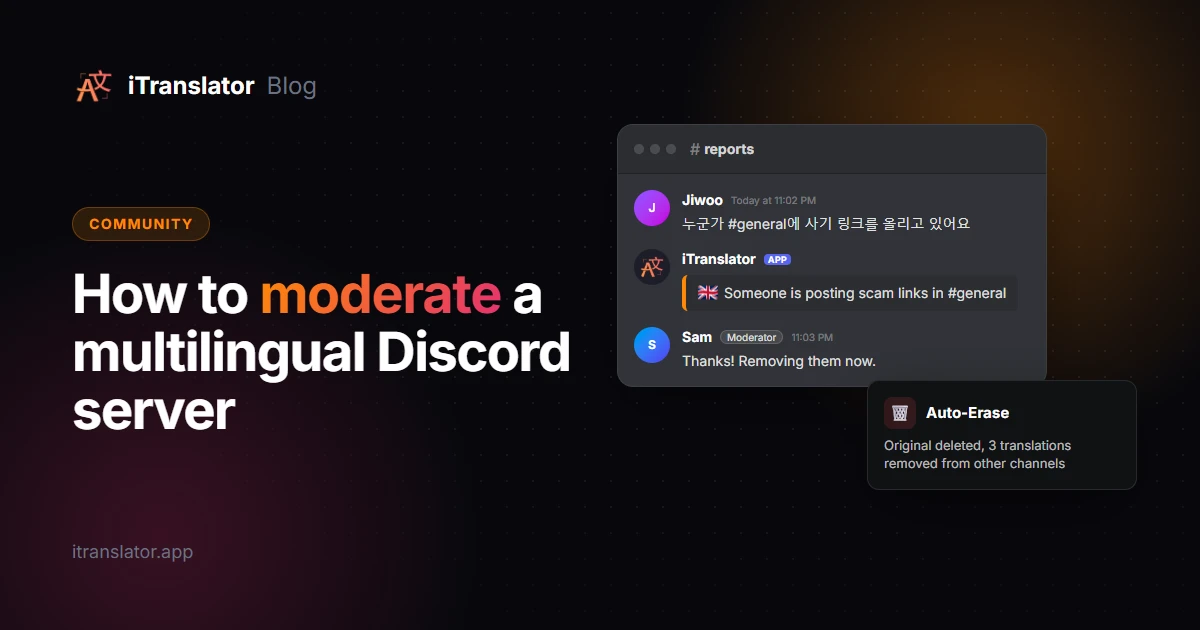
Auto-translate your report channel. Create a #reports channel where members can write in any language, then set up an auto-translation with that channel as both source and target, into English. Every report gets its translation posted right below it, so any moderator on shift can pick it up. Turn on Ignore if source is target so reports already written in English aren't posted twice.
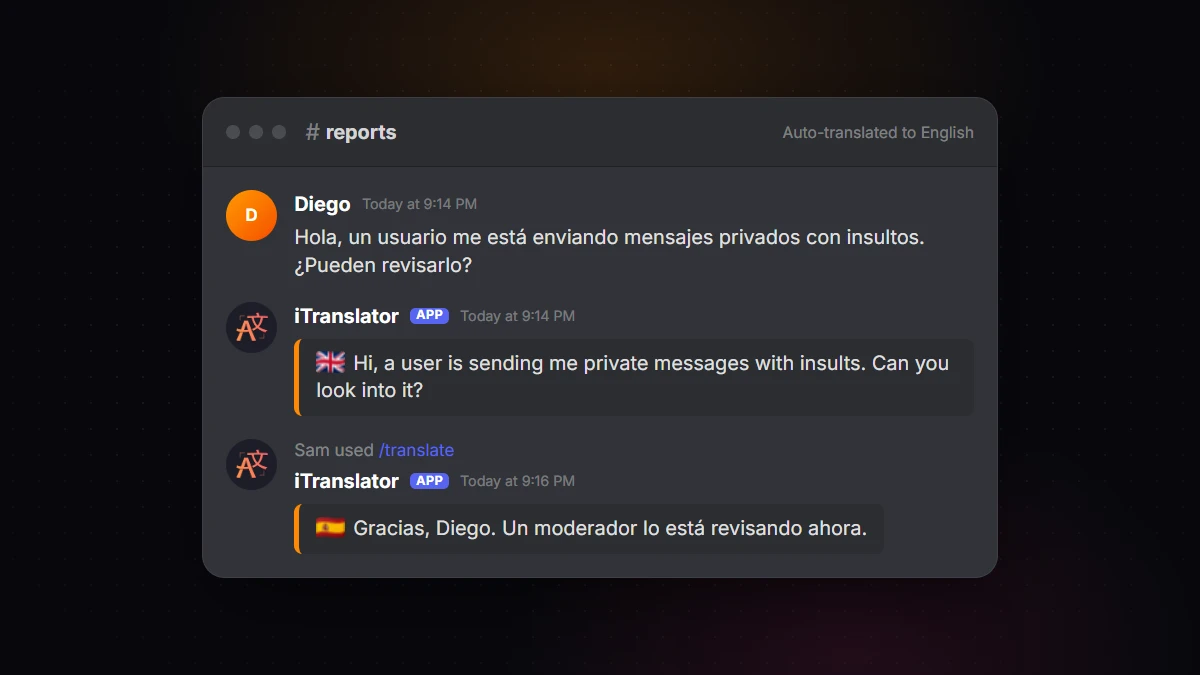
Reply in the member's language. Discord's guide suggests replying in the member's language to let them know a fluent moderator will handle their request. For that first reply, or when no fluent moderator is online, run your message through /translate: iTranslator posts the translation in the channel, where the member can read it.
Get better translations where it matters. For reports and staff channels, where nuance counts, the Pro AI plan translates with a large language model, which generally handles slang and context better. See the Premium plans for details.
To set this up, add iTranslator to your server, then configure the report channel from the dashboard under Auto-Translation.
Make sure translation doesn't work against your moderation
A translation bot copies messages into other channels, so it needs a few safeguards.
Turn on Auto-Erase. Without it, deleting a message only removes the original: its translations in #español or #français stay up, and so does the scam link or the insult inside them. With Auto-Erase enabled (free, in the dashboard under Configuration), deleting the original also deletes its translations. Turn it on from day one.
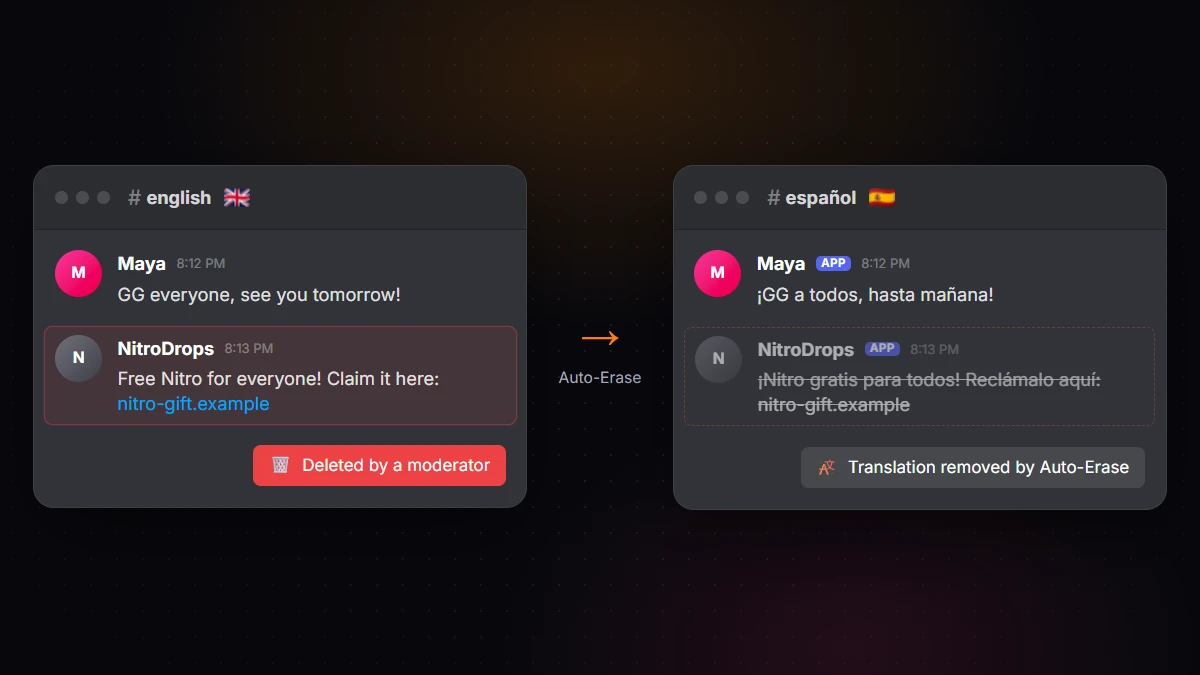
Moderate the original, not the copy. With the Webhook message style, translations appear under the original author's name and avatar. That's great for reading, but it means the message a moderator spots in #español may only be a translation. Find the original, delete it there, and Auto-Erase removes the translations with it.
Exclude bots and members with Translate-Ban. Log bots, music bots and level-up announcements don't need translating. Add them to Translate-Ban in the dashboard, along with any role or user whose messages shouldn't be copied, such as a member who floods channels to burn through your character limit. The free plan covers 3 users and 1 role, Premium goes up to 1,000 users and 100 roles.
Keep sensitive channels out of it. Add no-translate to the topic of your staff channels: flag reactions and role translation won't work there, and no auto-translation will be posted into them. To stop a channel from being translated, delete or edit its auto-translation configuration.
Build an escalation process that works across languages
A clear process keeps decisions consistent, whoever is online. Here's a simple one:
- AutoMod handles the obvious. Spam, scam phrases and your keyword lists are blocked automatically.
- The native-speaking moderator goes first. Reports in a language go to the moderator who speaks it when they are online.
- Anyone can act on clear-cut cases. Scam links, raids and explicit images don't need translation. The moderator on shift deals with them right away.
- Use reversible actions for language-dependent cases. If a case hinges on what a word means, delete the message and apply a short timeout, then wait for a native speaker to confirm before banning.
- Log everything in the staff language. Record the original text, its translation and the action taken in your mod log, so the next moderator has the full context.
Common pitfalls when moderating in several languages
Banning on the strength of a machine translation. This is the big one. Translation engines can turn friendly banter into an insult, miss sarcasm, or misread a word used differently in another country. A translation is enough to triage a report, not to ban someone. Get a fluent speaker's read first.
Ignoring cultural context. Jokes, gestures and even emojis carry different meanings in different communities. Your native-speaking moderators are your best defense against both over- and under-moderating.
Treating everyone else's language as a rule violation. Punishing members for not writing in English pushes them out. It works better to give each language its own channels and translate between them, as we explain in our guide to auto-translating Discord channels.
FAQ
Does Discord AutoMod work in other languages?
Partly. Discord's preset Commonly Flagged Words lists and its Spam Content filter are currently English-only. Custom Keyword Rules detect words and phrases in any language, so you can build your own keyword list for each language your server supports.
How many moderators does a multilingual server need?
There's no fixed number, but aim for at least one fluent moderator per featured language, and more if your members are spread across time zones. If you can't staff a language, it's usually better not to open channels for it yet.
Can a translation bot replace native-speaking moderators?
No, but it makes a small team much more effective. Translation lets any moderator understand reports and flagged messages and handle clear-cut cases. For decisions that depend on the exact meaning of a word, such as a ban for an insult, a fluent speaker should confirm first.
What happens to translations when a moderator deletes a message?
By default, deleting the original leaves its translations in place. With iTranslator's Auto-Erase enabled, deleting the original also deletes its translations, including those posted in other channels.
Should I make my Discord server English-only?
You can, but you may lose members who aren't comfortable in English. A common alternative is to keep English as the staff language and give each community its own channels, with translation keeping everyone connected.
Break the language barrier on your server
iTranslator translates every message automatically in 109+ languages, so everyone can chat in their own language. Set up in 2 minutes.
Add to DiscordFree to start · No credit card required