iTranslator vs Discord Translator (NVU): 2026 Comparison
iTranslator vs Discord Translator, the "Translator" bot by NVU: features, free tiers, one-time character packs vs subscriptions, and which fits your server.
On this page
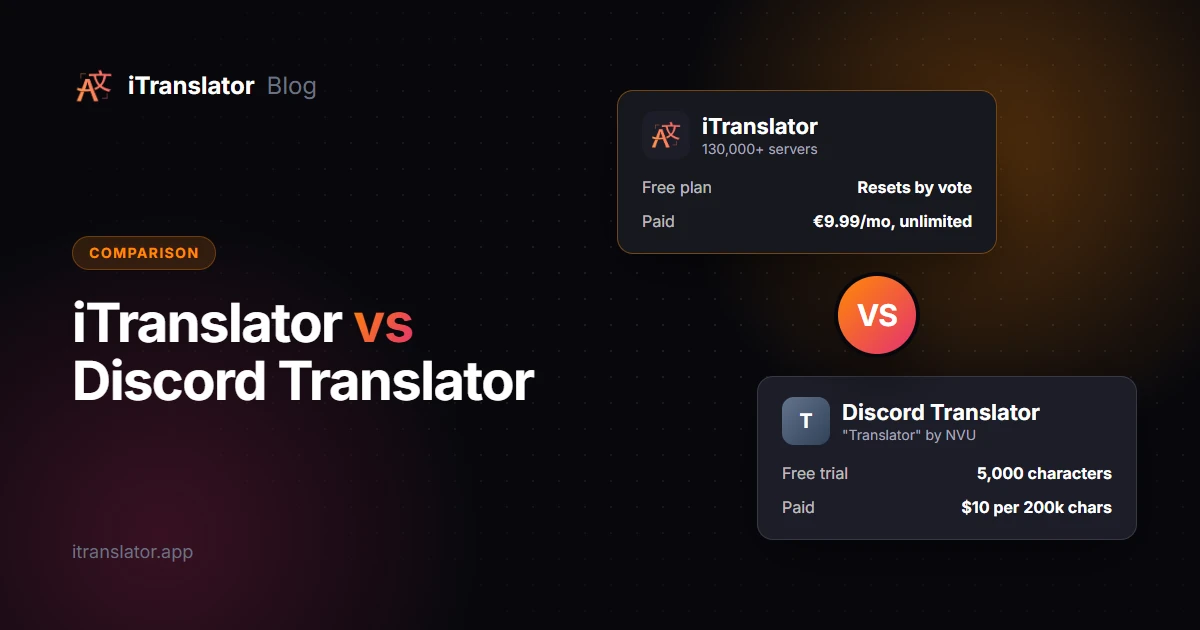
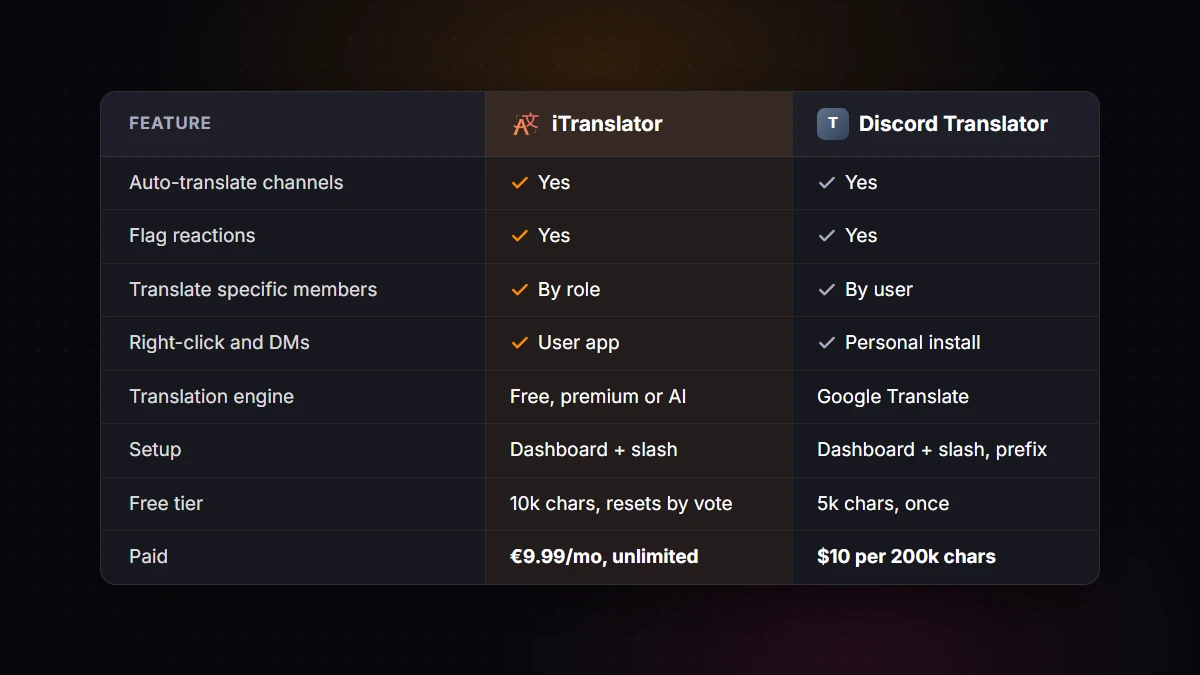
iTranslator and Discord Translator both translate Discord messages automatically, with flag reactions, commands, a dashboard and a personal install for DMs. The real difference is how you pay and what comes on top. Discord Translator (the "Translator" bot by NVU) sells one-time character packs and translates with Google Translate, which suits servers that translate occasionally. iTranslator has a free plan you can reset by voting and unlimited subscriptions from €9.99/month, plus role-based translation on every plan and AI translation and voice features on its Pro AI plan, which suits active multilingual servers.
Here's a feature-by-feature comparison, a look at what each pricing model really costs, and a clear answer on who should pick which.
Disclosure: iTranslator is our bot. Everything we say about Discord Translator comes from its own website (nvu.io), checked in September 2026. Check its site for the latest details before deciding.
iTranslator vs Discord Translator at a glance
| iTranslator | Discord Translator (NVU) | |
|---|---|---|
| Servers | 130,000+ | 300K+ (claimed) |
| Languages | 109+ (30 on the free plan) | 100+ |
| Auto-translate channels | Yes, into separate channels or the same channel (categories on Premium) | Yes, linked channels, synced categories or the same channel |
| Flag reactions | Yes | Yes |
| Translate specific members | Yes, by role | Yes, specific users |
| Right-click translation | Yes ("Translate Text") | Yes |
| Direct messages | Yes, with the user app | Yes, with the personal install (private replies) |
| Setup | Web dashboard + slash commands | Dashboard + slash and prefix commands |
| Translation engine | Free engine, more accurate engine (Premium), AI (Pro AI) | Google Translate |
| Voice | Text-to-speech and transcription (Pro AI) | Text-to-speech currently disabled |
| Free tier | 10,000 characters per server, reset for free by voting every 12 hours | 5,000-character trial, once |
| Paid plans | €9.99/month unlimited (€8.32/month yearly) | $10 for 200,000 characters, one-time |
iTranslator prices exclude VAT. Discord Translator's details come from its website, pricing page, FAQ and update log.
The biggest difference: how you pay
Both bots start free. After that, they follow opposite logics, and that decides which one is cheaper for you.
Discord Translator: one-time character packs
According to its pricing page, Discord Translator's free trial includes 5,000 characters in total, which NVU estimates at about 100 translations. During the trial, automatic translation is limited to two languages.
After that, you buy characters. The $10 plan gives you 200,000 characters (about 4,000 translations by NVU's estimate) and up to 50 languages for multi-translation. There are no subscriptions, no automatic charges and no time limit: when the characters run out, you buy another plan. Payment currently goes through PayPal.
Two details from its FAQ matter when you estimate your needs:
- Every character counts, including spaces, numbers and symbols, and automatic language detection also counts toward the quota.
- Multiple languages multiply the count. Translating "hello" into Spanish and French counts as 10 characters.
iTranslator: a free plan that resets, then flat subscriptions
iTranslator's free plan gives each server 10,000 characters. When they run out, any member can reset them for free every 12 hours: run /checkvote, vote for the bot on top.gg, and run /checkvote again. The free plan also includes up to 30 auto-translation setups and 3 role-translation setups. (The personal install, used in DMs and servers without the bot, has its own allowance of 2,000 characters per user.)
If you'd rather not think about counters, Premium costs €9.99/month (or €99.90/year, which works out to €8.32/month) and removes the server's character limit entirely. It also unlocks all 109+ languages and a more accurate translation engine. Pro AI (€29.99/month, or €24.99/month yearly) adds AI translation and voice features. One subscription covers one server.
Which one costs less?
It depends almost entirely on your volume. Here are three rough examples, assuming messages of about 60 to 80 characters:
- A light server: 20 flag translations a day of about 80 characters, so 1,600 characters a day. A 200,000-character pack lasts about 4 months, which makes Discord Translator's $10 very reasonable. iTranslator's free plan would cover the same usage too, as long as someone votes when the counter runs out.
- An active channel pair:
#englishand#españollinked together, with 300 messages a day of about 60 characters. That's 18,000 characters a day, so a pack lasts about 11 days. Over a month, that's about 540,000 characters: roughly three $10 packs, or a little more than one of NVU's larger packs ($25 for 525,000 characters), so around $25 to $30 a month, against a flat €9.99 for iTranslator Premium. - A four-language server: the same 300 messages, each translated into three other languages. The count triples to 54,000 characters a day, and a pack lasts about 4 days.
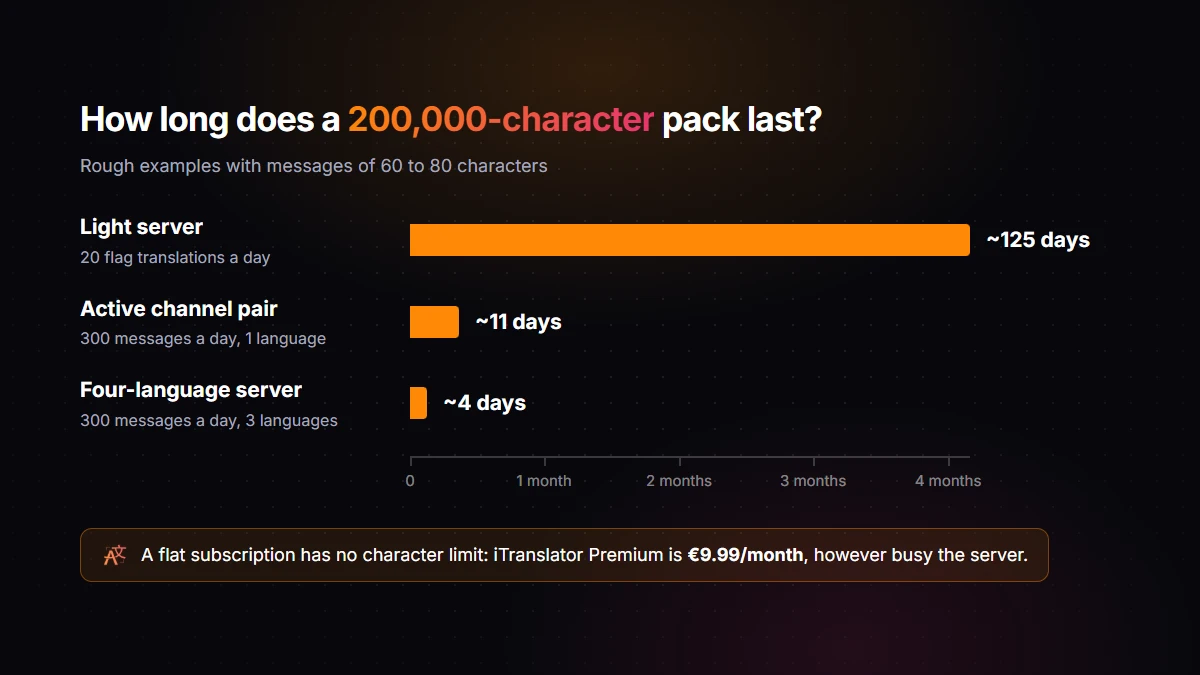
In short: character packs are the cheapest option when translation is occasional. As soon as you auto-translate busy channels, and especially into several languages, a flat subscription wins, and the free plan's vote reset gives you a way to test that before paying anything.
Setting up auto-translation
Discord Translator is configured from its dashboard, where you edit each channel's automatic translation settings (linked group or same-channel, the channel's language and the style), or with commands, including prefix commands such as -translate channel auto group or the shortcut -translate auto set. It can also mirror whole language categories with Synced Categories, which pairs their channels by position. Its wiki recommends linked language channels as the best way to auto-translate more than two languages.
iTranslator is built around its web dashboard. To link two channels:
- Add iTranslator to your server and keep the pre-selected permissions.
- Open the dashboard, log in with Discord and pick your server.
- Go to Auto-Translation, choose the source channel, the target channel and the target language, then save.
Slash commands like /autotranslate create do the same thing if you prefer typing. With the Webhook style, translations appear under the original author's name and avatar, so a translated channel reads like a normal conversation. Our auto-translation tutorial walks through every option, and the multilingual server guide helps you decide between one channel per language and a shared channel.
Both bots also support webhook-style output: Discord Translator lists it among its 10+ message styles.
Where they differ
What iTranslator adds
- Role-based translation. Give members a role such as
Español, and everything they write is translated automatically, in every channel. The free plan includes three role setups. Discord Translator translates specific users instead: you add them one by one, and the bot gives them an auto-translate role. See our guide to Discord language roles. - A free plan that keeps working. Instead of a one-time trial, the 10,000 free characters per server can be reset for free every 12 hours by voting, so a small server can stay on the free plan.
- AI translation. The Pro AI plan translates with an OpenAI large language model, which handles slang, tone and context better than classic machine translation. Its Conversation Mode groups a member's quick consecutive messages and translates them together.
- Voice. Pro AI adds text-to-speech and voice channel transcription. Discord Translator's FAQ says its text-to-speech is currently disabled.
- Server customization. Premium lets you rename the bot and change its avatar per server (Custom Bot) and write custom message formats. Every plan also includes Text-Replacement rules, which rewrite text before it's translated (expanding clan shorthand like "RSS" into "resources", for example).
What Discord Translator does well
- Reach. With 300K+ servers claimed on its website, it's the most installed translation bot on Discord and has a long track record.
- Pay once, no subscription. If you translate a little, a single pack can last months, and you're never charged automatically.
- Edits stay in sync. When a message is edited, Discord Translator updates its translations, and deletions are synced too.
- Styles and commands. 10+ translation styles, custom prefixes, and both slash and prefix commands.
Several features now exist on both bots. Each offers a personal install for DMs and group DMs, whole categories as sources or targets (Synced Categories on Discord Translator, Premium on iTranslator), and a way to keep words untranslated on Premium (Ignore Words on Discord Translator, <angle brackets> around a word on iTranslator).
Both bots also handle flag reactions the same way: react with a country flag and the bot replies with the translation, and both can send it by DM instead. With iTranslator, flag translations can disappear after a few seconds, and Premium can send them by DM or in a thread. Our flag reaction tutorial covers the details.
Which one should you choose?
Choose Discord Translator if you translate a few messages a day, prefer paying once over a subscription, and find Google Translate quality good enough for your community.
Choose iTranslator if your channels are translated all day, you want a free plan that keeps working, you want to translate members by role, or you need AI quality, voice features or a bot with its own name and avatar on your server. Its dashboard is available in 28 languages. For a broader look at the alternatives, see our comparison of the best Discord translation bots.
Switching? You can keep both bots during the transition, but never auto-translate the same channels with both, or members will see duplicate translations. Recreate your linked channels on iTranslator's Auto-Translation page, check that translations arrive, then remove the old setup.
FAQ
Is Discord Translator free?
It has a free trial of 5,000 characters in total, which NVU estimates at about 100 translations, with automatic translation limited to two languages. After that, you buy character packs, starting at $10 for 200,000 characters. The characters don't reset over time.
Is "Translator" the same bot as Discord Translator?
Yes. The bot that appears as Translator in Discord and in the App Directory is Discord Translator by NVU, the same application you install from nvu.io.
Which bot is better for auto-translating busy channels?
Both can auto-translate channels, either into linked language channels or below the original message. For busy channels, iTranslator's flat Premium subscription avoids running out of characters, while a character pack drains faster with every message and every extra language.
Does Discord Translator work in DMs?
Yes. Since June 2024, you can install Translator on your account and use it in DMs and group DMs, with replies only you can see. Its FAQ's note that DMs are disabled refers to messaging the bot itself. iTranslator works in DMs too when you install it on your account from the invite page: choose Try it now (use this app anywhere!) (Add to My Apps on some versions of Discord).
Which one translates better?
Discord Translator uses Google Translate, according to its FAQ. iTranslator uses a free engine on the free plan, a more accurate engine on Premium, and a large language model on Pro AI, which does best with slang and context. For any bot, setting the source language and avoiding one-word messages improves results.
Can I use both bots on the same server?
Yes, as long as they don't translate the same channels. Otherwise, messages get translated twice, and one bot may even translate the other's translations.
Break the language barrier on your server
iTranslator translates every message automatically in 109+ languages, so everyone can chat in their own language. Set up in 2 minutes.
Add to DiscordFree to start · No credit card required