Best Discord Translation Bots in 2026 (Compared)
We compared 8 Discord translation bots for 2026, including iTranslator, Translator (NVU), Talksy and BabelBot: features, free tiers and real prices.
On this page
- The best Discord translation bots at a glance
- 1. iTranslator: the best all-round translation bot
- 2. Discord Translator (NVU): the most installed
- 3. Interaction Bot: translation plus text-to-speech
- 4. Talksy: translations that post as the speaker
- 5. TranslateBot: linked channels with character packs
- 6. RitaBot: Google and DeepL, priced by channel setups
- 7. BabelBot: context-aware AI translation
- 8. HephBot Translate: unlimited free basic translations
- Feature comparison
- How to choose the right Discord translation bot
- Which Discord translation bot should you pick?
- FAQ
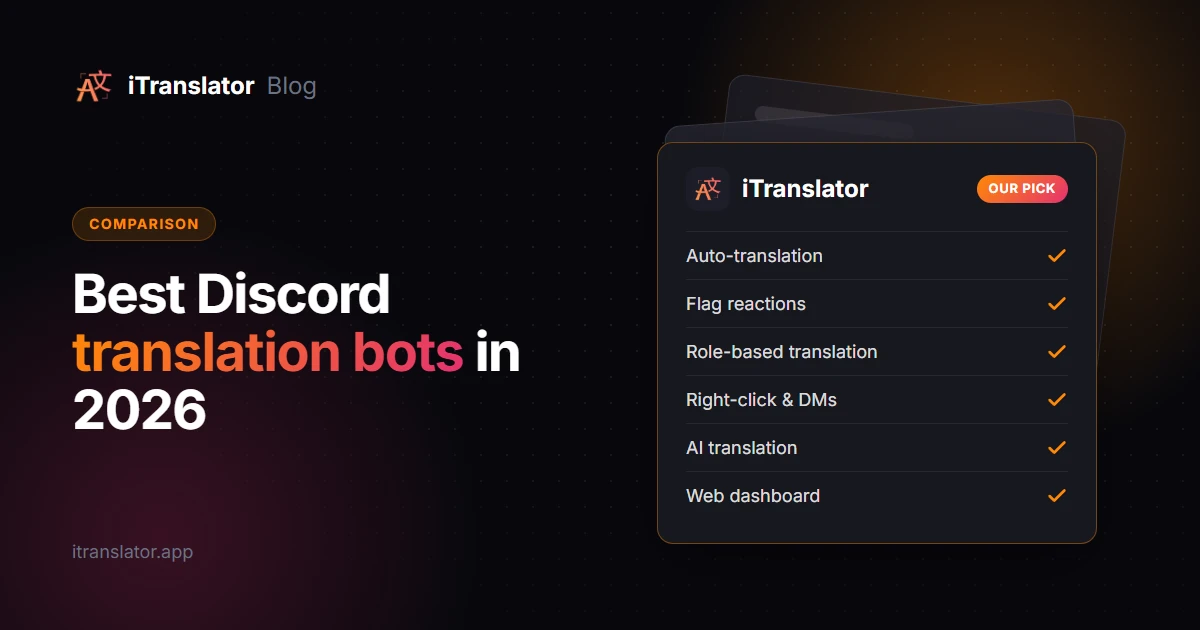
The best Discord translation bot for most servers in 2026 is iTranslator. It's free to start, it covers every translation method (auto-translation, flag reactions, role-based translation, right-click and /translate), and you configure it from a web dashboard instead of memorizing commands. Discord Translator (the "Translator" bot by NVU) is the most installed and suits light usage with one-time character packs. BabelBot and HephBot Translate are worth a look if you want context-aware AI or unlimited free basic translations.
Below, we compare eight bots side by side: what each one is good at, how it charges, and who it's for. Then we walk through the criteria that should drive your choice.
Disclosure: iTranslator is our bot. To keep this comparison fair, every competitor detail comes from that bot's own website, checked in September 2026, and we link to each source so you can verify it. Prices change, so double-check before you buy.
The best Discord translation bots at a glance
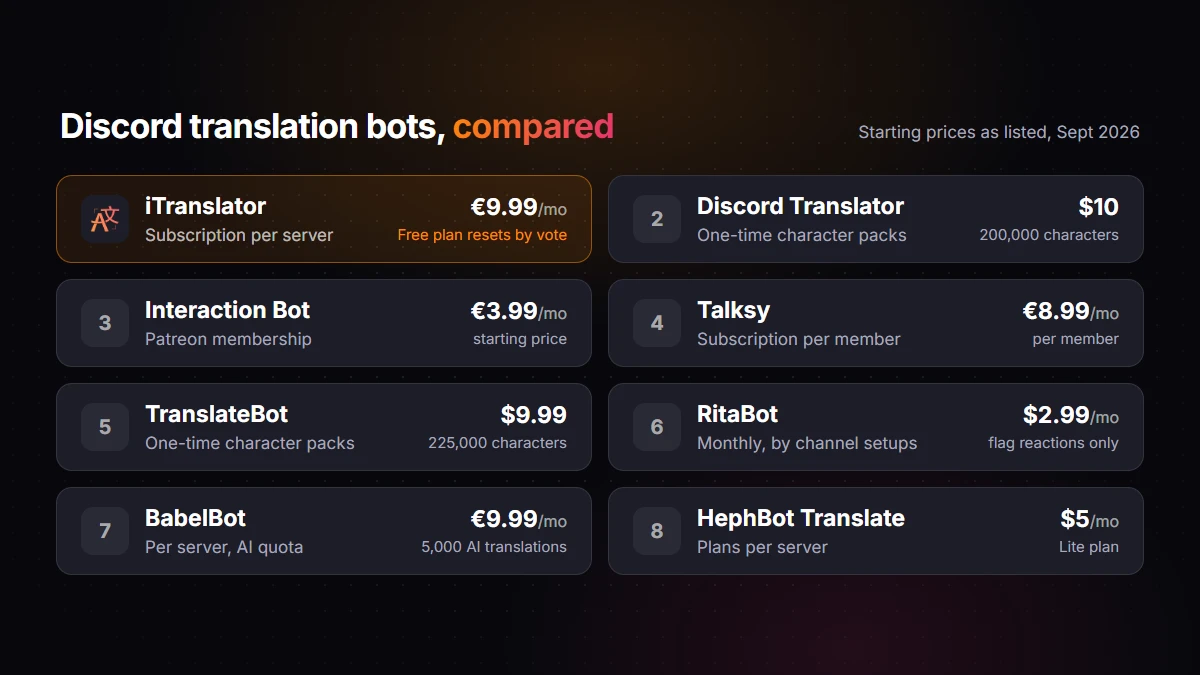
| Bot | Best for | Free tier | Paid model | Starting price |
|---|---|---|---|---|
| iTranslator | Most servers: every method, dashboard, AI option | 10,000 characters per server, reset for free by voting every 12 hours | Subscription per server | €9.99/mo (€8.32/mo yearly) |
| Discord Translator (NVU) | Light or occasional use | 5,000-character trial | One-time character packs | $10 for 200,000 characters |
| Interaction Bot | Translation plus text-to-speech | Free, with caps on setups | Patreon membership | From €3.99/mo |
| Talksy | A few members who want their own messages translated | Monthly allowances per member | Subscription per member | €8.99/mo |
| TranslateBot | Linked channels, pay as you go | 15,000-character demo | One-time character packs | $9.99 for 225,000 characters |
| RitaBot | Google and DeepL with many channel setups | 1-month free trial (25 tasks, 10,000 characters) | Monthly, by number of channel setups | $2.99/mo (flags only) |
| BabelBot | Context-aware AI translation | 100 AI translations, then 50/month | Subscription per server | €9.99/mo |
| HephBot Translate | Unlimited free basic translations | Unlimited standard translator | Plans per server | $5/month per server |
Competitor prices are the ones listed on their websites in September 2026. iTranslator's prices exclude VAT.
1. iTranslator: the best all-round translation bot
iTranslator runs on 130,000+ Discord servers and was verified by Discord in July 2022. Its main strength is coverage: it supports all five ways of translating on Discord, so you can combine them on one server instead of forcing everyone into a single workflow.
- Auto-translation: every message in a channel is translated into another channel (
#englishto#español, for example) or posted right below the original. With the Webhook style, translations show the original author's name and avatar. - Flag reactions: anyone reacts with a country flag and gets the translation in that country's language.
- Role-based translation: messages from members with a role, say
Português, are translated automatically in every channel. - Right-click → Apps → Translate Text (only you see the result) and
/translate, which also work in DMs, group DMs and servers without the bot once you install iTranslator on your own account as a user app.
Everything is set up from a web dashboard: you pick channels and languages from menus and save, with no command syntax to learn. The dashboard is available in 28 interface languages, which helps when your admins aren't all English speakers. If you're new to the topic, our guide on how to translate messages on Discord shows each method in action.
Pricing. The free plan gives each server 10,000 characters, and any member can reset them for free every 12 hours by voting for the bot on top.gg and running /checkvote. It includes up to 30 auto-translation setups and 3 role-translation setups, with 30 languages. Premium (€9.99/month, or €8.32/month billed yearly) removes the character limit, unlocks all 109+ languages and switches to a more accurate translation engine. Pro AI (€29.99/month, or €24.99/month yearly) translates with an OpenAI large language model, which handles slang and context better, and adds voice features: text-to-speech and voice channel transcription.
Who it's for: community servers of any size that want reliable auto-translation without watching a character budget, and admins who prefer a dashboard to commands.
Trade-offs: the free plan relies on voting to reset its counter, AI translation requires the Pro AI plan, and one subscription covers one server.
Add iTranslator to your server and try every method on the free plan.
2. Discord Translator (NVU): the most installed
Discord Translator, which shows up as Translator inside Discord, is the veteran of the category. According to its website (September 2026), it runs on 300K+ servers, the largest number any translation bot claims.
It covers the classic methods: translation commands, flag reactions, and automatic translation of channels (under each message, across linked language channels or across synced categories) or of specific users. It supports over 100 languages, offers 10+ message styles including a webhook style, and syncs edits and deletions with the translations. You set it up from its dashboard, with slash commands or with prefix commands like -translate. Its FAQ states that translations come from Google Translate. Since June 2024, you can also install Translator on your own account and translate privately with Apps → Translate or slash commands, including in DMs and group DMs.
Pricing. There's no subscription. According to its pricing page, the free trial includes 5,000 characters in total, and automatic translation is limited to 2 languages during the trial. After that, you buy characters: $10 gets you 200,000, with no time limit and no automatic renewal. Translating a message into two languages counts its characters twice.
Who it's for: servers that translate occasionally, where a single pack can last a long time. Busy auto-translated channels use characters much faster (see the pricing section below).
3. Interaction Bot: translation plus text-to-speech
Interaction Bot pairs translation with voice features. According to its website, it translates into over 100 languages, reads messages aloud in voice channels with text-to-speech, and offers speech-to-text. Its dashboard covers channel, role, category and flag translation, and its public status page listed about 56,000 servers in September 2026.
Pricing. According to its website, the free version has no character cap but limits your setups, including 20 channel translations and 20 role translations per server. Premium, sold through Patreon from €3.99/month, removes those caps and lets the bot translate messages from other bots.
Who it's for: budget servers that want text-to-speech in voice channels alongside translation.
4. Talksy: translations that post as the speaker
Talksy takes a member-first approach. Members opt in with /talksy language:spanish, and from then on each message they send is also posted in that language, right below, under their own name and avatar. It also offers flag reactions, channel routes that mirror a channel into another language, a per-server glossary of words to keep untranslated, and a "stealth mode" that replaces the original, set up with slash commands or from its dashboard. Talksy says its translations are handled by an AI translation provider, which it doesn't name. Members can install Talksy on their account to translate in any server and in DMs, and it supports 100+ languages.
Pricing. According to its pricing page, the free plan gives each member monthly allowances: 100 inline auto-translations, 100 /translate and right-click translations, and 50 flag translations, plus one channel route per server with 200 routed messages a month. Talksy Pro costs €8.99/month (€86.30/year) and is per member: it follows your account into every server you join. A Pro member can also "sponsor" a server, which unlocks unlimited routes there and, according to Talksy's docs, lets that server's members bypass their personal caps (its pricing page, however, says each member's translation budget stays personal).
Who it's for: servers where a handful of members need translation, or individuals who want unlimited translation everywhere. Talksy itself says the free plan "covers casual chat", so a busy community will likely need Pro members or a sponsor.
5. TranslateBot: linked channels with character packs
TranslateBot focuses on linked channels (a message posted in one channel appears in the others, translated), user auto-translation and flag reactions, with 100+ languages and custom welcome messages. Its website claims more than 3,000 servers.
Pricing. A one-time demo with 15,000 characters, then one-time packs that never expire: $9.99 for 225,000 characters, $19.99 for 550,000 and $39.99 for 1,200,000.
Who it's for: servers that prefer paying once and mostly need linked language channels.
6. RitaBot: Google and DeepL, priced by channel setups
RitaBot translates with Google and DeepL, backed by its own machine-learning engine, and claims 166+ languages. It handles translation channels, flag reactions, links between channels on different servers, webhook-style output, and forums and threads, all managed with slash commands.
Pricing. RitaBot charges by the number of auto-translation "tasks" (channel setups) rather than by characters: $2.99/month for flag reactions only, $6.99/month for 100 tasks, and up to $21.99/month for 550 tasks. There's no permanent free plan, but a one-month free trial, started with !tr trial, includes 25 tasks and 10,000 characters (one trial per server or user).
Who it's for: large server networks that need many channel setups and want DeepL in the mix.
7. BabelBot: context-aware AI translation
BabelBot is built around AI translation. It can read up to five earlier messages in the channel so jokes, slang and short replies keep their meaning, and it offers replies, threads, linked channels, a glossary of custom words and a "replace the original" mode. Paid plans also translate screenshots, PDFs, voice notes and videos, and the Ultra plan adds live voice chat translation. It claims 130+ languages and 1,500+ servers.
Pricing. The free plan includes 100 AI translations to start, then 50 per month, with 2 target languages; supported plain text keeps being translated after the AI allowance runs out. Pro costs €9.99/month per server (5,000 AI translations, 5 target languages) and Ultra €19.99/month (25,000 AI translations, 10 target languages).
Who it's for: smaller servers where translation quality on slang and tone matters more than volume, and where up to 10 target languages is enough.
8. HephBot Translate: unlimited free basic translations
HephBot Translate has the most generous free tier in this list. Its standard translator is free with no character limits and covers 35+ languages, with flag reactions, default-language channels, channel mirroring and right-click translation. Paid plans switch the server to its Premium translator, which it describes as better with slang, typos and context.
Pricing. Lite costs $5/month per server and includes 1,000,000 Premium-translator characters a month (the standard translator takes over after that). Premium costs $15/month per server and adds unlimited Premium-translator characters, category auto-setup and two personal seats.
Who it's for: servers on a zero budget whose members speak widely used languages.
Feature comparison
| Bot | Languages | Translation engine | Setup | Personal install | Notable extras |
|---|---|---|---|---|---|
| iTranslator | 109+ | Free engine, premium engine, AI (Pro AI) | Dashboard + slash commands | Yes, in any server and DMs | Role-based translation, voice (Pro AI), dashboard in 28 languages |
| Discord Translator | 100+ | Google Translate | Dashboard + slash and prefix commands | Yes, including DMs (private replies) | Auto-translate specific users, edit sync, 10+ styles |
| Interaction Bot | 100+ | Not stated | Dashboard | Not listed | Text-to-speech, speech-to-text |
| Talksy | 100+ | AI (provider not named) | Setup button, slash commands + dashboard | Yes, in any server and DMs | Per-member opt-in, glossary, stealth mode |
| TranslateBot | 100+ | Not stated | Commands + dashboard | Not listed | Welcome messages |
| RitaBot | 166+ | Google, DeepL, in-house engine | Slash commands | Not listed | Cross-server channels, forums and threads |
| BabelBot | 130+ | AI with channel context | Dashboard onboarding | Yes, including DMs | Media translation, live voice (Ultra) |
| HephBot Translate | 35+ (standard) | Standard and Premium translators | Dashboard + slash commands | Personal access by vote or seats | Category auto-setup (Premium) |
"Not stated" and "Not listed" mean we couldn't find the information on the bot's website, not that the feature is missing.
How to choose the right Discord translation bot
Nearly every bot here can translate a message. The differences are in how it translates, how much it lets you translate, and how well. Five questions will narrow the list down quickly. (If several people manage your server, also favor a bot with a dashboard: the feature table above shows which ones have one.)
Which translation methods do you need?
Start from how your server actually talks, then pick the method that fits:
- One channel per language (
#english,#français,#español): you need auto-translation between channels, called linked channels, routes or mirrors depending on the bot. Our guide to setting up a multilingual Discord server helps you choose a structure. - One shared channel where everyone chats: same-channel auto-translation, or Talksy's per-member inline translations.
- A mostly English server with an international minority: flag reactions, so only people who need a translation trigger one.
- A few members who always write in another language: role-based translation (iTranslator, Interaction Bot) or user translation (Discord Translator, TranslateBot, Talksy).
- Direct messages: only apps you can install on your own account work there. iTranslator, Discord Translator, Talksy and BabelBot offer one, and HephBot gives personal access through votes or seats.
If you need several of these at once, a bot that covers them all saves you from running two translation bots side by side.
How generous is the free tier, really?
Free tiers come in four shapes. Character budgets that reset (iTranslator's 10,000 characters, reset for free by voting every 12 hours) or don't (Discord Translator's 5,000-character trial, TranslateBot's 15,000-character demo, RitaBot's one-month trial). Per-member allowances (Talksy). AI quotas (BabelBot's 50 AI translations a month). And unlimited basic translation with other limits (HephBot's 35+ languages, Interaction Bot's setup caps).
A free tier that resets matters more than its size: a one-time trial tells you whether you like a bot, while a resettable one can run a small server indefinitely.
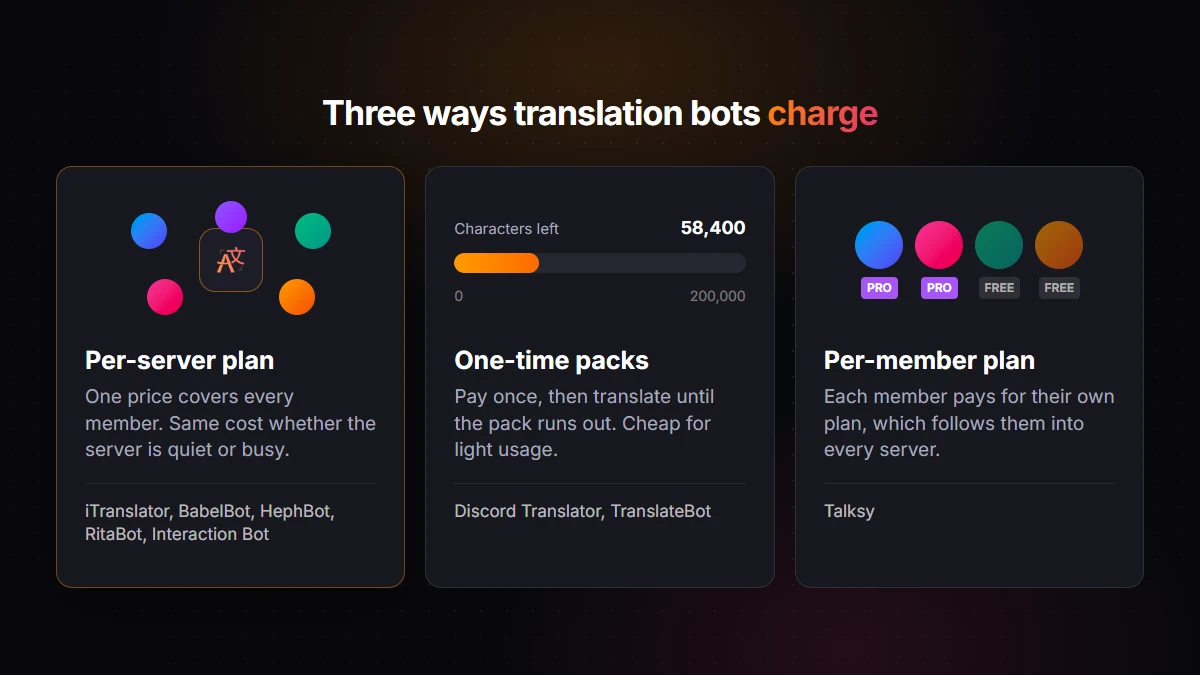
Subscription, character packs or per member?
This is where the bots differ the most, and the right model depends on your volume.
- Per-server subscriptions (iTranslator, BabelBot, HephBot, RitaBot, and Interaction Bot, whose Patreon tiers cover 1, 3 or 10 servers) cost the same whether your server is quiet or busy.
- One-time character packs (Discord Translator, TranslateBot) cost nothing while you're not translating, but every message draws from the pack.
- Per-member subscriptions (Talksy) follow one person into every server they join, which is cheap if only one or two people need unlimited translation. According to Talksy's docs, a Pro member who sponsors a server also lifts the other members' personal caps there.
A rough example: an English and Spanish channel pair with 300 messages a day of about 60 characters each uses around 18,000 characters a day. A 200,000-character pack would last about 11 days. The same pack would last more than three months on a server that translates 30 short messages a day. So packs suit light usage, and flat subscriptions suit active channels.
Classic machine translation or AI?
Classic engines like Google Translate and DeepL are fast and handle everyday sentences well. Large language models do better with slang, sarcasm, gaming jargon and messages that only make sense in context. BabelBot is AI-first, Talksy says an AI translation provider handles its translations, iTranslator offers AI translation on its Pro AI plan (plus a more accurate engine on Premium), and HephBot's Premium translator also targets messy chat. If your members mostly write short, standard sentences, a classic engine is usually enough.
How many languages do you really need?
Almost every bot claims 100+ languages, so the headline number rarely decides anything. Check two things instead: whether your languages are included on the plan you'll use (iTranslator's free plan covers 30 languages and Premium unlocks all 109+, HephBot's free standard translator covers 35+), and how many target languages you can use at once (2 during Discord Translator's trial, 2 to 10 on BabelBot's plans).
Which Discord translation bot should you pick?
- iTranslator if you want one bot that covers every method, a dashboard, a free plan that keeps working, and unlimited plans when you grow.
- Discord Translator (NVU) if you translate rarely or prefer to pay once.
- Talksy if only a few members need translation and want it in every server they join, with AI translation even on the free plan.
- BabelBot if AI context matters most and your volume is modest.
- HephBot Translate if your budget is zero and your languages are in its standard set.
- Interaction Bot if you want text-to-speech in voice channels on a budget.
- RitaBot if you need DeepL and many channel setups; TranslateBot if you want simple pay-once linked channels.
FAQ
What is the best free Discord translation bot?
It depends on what "free" needs to cover. iTranslator's free plan includes every translation method, a dashboard and 10,000 characters per server that any member can reset for free every 12 hours by voting. HephBot Translate offers unlimited translations with its standard translator in 35+ languages, and Interaction Bot has no character cap but limits the number of setups.
What is the most popular Discord translation bot?
By claimed installs, Discord Translator by NVU is the largest, with 300K+ servers according to its website. iTranslator runs on 130,000+ servers. Among the others, Interaction Bot's status page showed about 56,000 servers, while newer bots like TranslateBot and BabelBot report a few thousand or fewer.
Do Discord translation bots use AI?
Some do. BabelBot is built around AI translation, Talksy says an AI translation provider handles its translations, and iTranslator's Pro AI plan translates with a large language model (its Free and Premium plans use classic machine translation engines, not a language model). Others rely on classic engines: Discord Translator uses Google Translate according to its FAQ, and RitaBot uses Google and DeepL.
Can a bot translate every message on my server automatically?
Yes. Discord has no built-in auto-translation as of 2026, but most bots here offer it: every message in a channel is translated into another channel or posted below the original. With iTranslator, you set it up from the dashboard's Auto-Translation page by picking the channels and the target language.
Can I translate Discord DMs with a bot?
Bots can't join direct messages, but apps you install on your own account can. iTranslator, Discord Translator, Talksy and BabelBot all offer a personal install that works in DMs. With iTranslator, open the invite page, choose Try it now (use this app anywhere!) (Add to My Apps on some versions of Discord), and Translate Text appears under Apps in the right-click menu of your DMs, group chats and servers without the bot. Only you see its translations, and the personal install includes 2,000 free characters per user.
Are Discord translation bots safe?
A bot added through Discord's official authorization screen only gets the permissions you approve, so check what it asks for and read its data policy. iTranslator processes messages on the fly and doesn't save them in a database, while Talksy, for example, says it keeps messages and translations for 30 days. Avoid client mods like BetterDiscord translation plugins, which break Discord's Terms of Service.
Break the language barrier on your server
iTranslator translates every message automatically in 109+ languages, so everyone can chat in their own language. Set up in 2 minutes.
Add to DiscordFree to start · No credit card required